
Features
tab by tab.
What a user of your app sees and can do, with the source file behind each part. There is no admin panel and no backend: every setting is on the user's device.
01Onboarding
On first launch a full-screen, three-page introduction explains what the app removes, what iOS allows (no app can change the native social apps; the Lock tab can lock them) and that sign-in happens on each site's own page with no account and no server (OnboardingView.swift). It is shown once; the flag is stored as onboarded in the app's user defaults. Delete and reinstall the app to see it again.
02Site tabs
Each site tab is a WKWebView that loads the site's mobile web page (Browser.swift):
- Each tab keeps its page when you switch tabs. A site that was never opened is never loaded.
- Sign-ins are stored in the shared iOS web data store, like in a browser.
- Pull down to reload. Swipe from the edge to go back.
- Links to other websites open in a Safari sheet (
SFSafariViewController), so the tab stays on its site. - Videos never autoplay with sound: playback needs a tap (
mediaTypesRequiringUserActionForPlayback = .all). - The app identifies itself to the sites as mobile Safari so their sign-in pages accept it.
- If a site asks for the camera or microphone (for example to post a photo), iOS asks the user with the texts set in
project.yml.
The filters each tab applies are listed on Filters.
03Lock tab
Lock native apps with Screen Time: choose apps, lock for 15, 30, 60 or 120 minutes with a live countdown and an End lock button, or set daily quiet hours with From and To times. Details and Apple's requirements: Screen Time.
04Settings tab
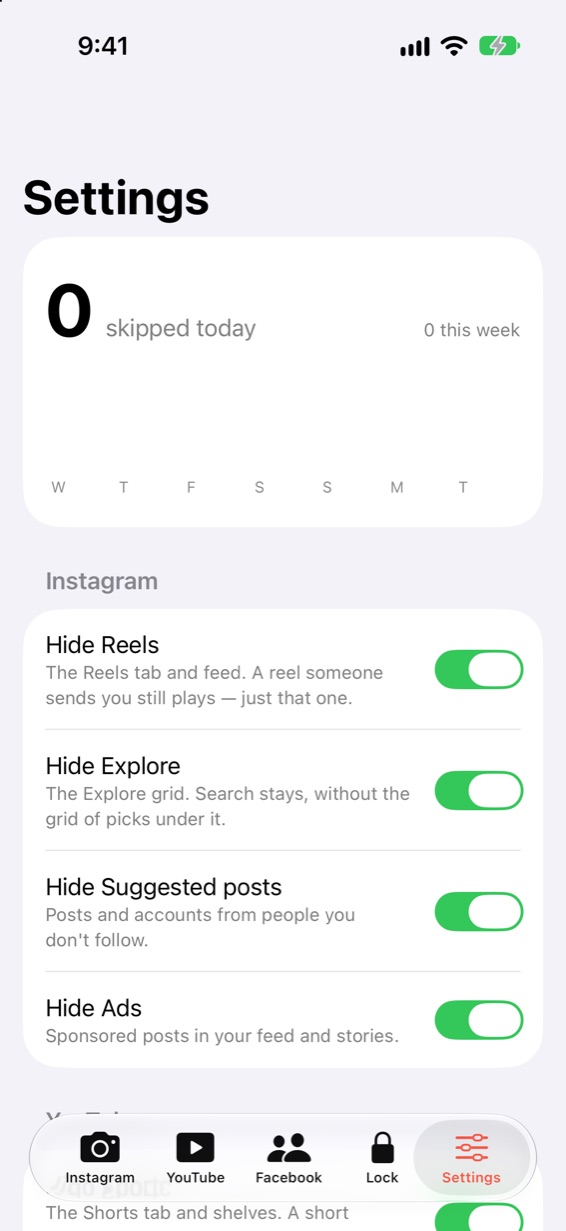
- Skipped today: a counter, the total for the week and a 7-day bar chart (Swift Charts). Kept for 30 days on the device (
StatsinSettings.swift). It counts redirects (for example a Shorts page sent to Subscriptions) and posts hidden by label. Elements hidden by CSS selector are not counted, so the number is a lower bound. - One switch per filter, grouped by site, each with a one-line explanation. All filters start on. Changing one reloads that site's tab.
- Sign Out of Everything: after a confirmation, deletes all website data (cookies, storage, cache) of every tab.
- Version number, and links to your privacy policy, support and credits (AppConfig).
- A footer that names the open-source base and says the app is not affiliated with the sites or their owners. Keep that sentence.
05What is not in the app
So you know before you plan around it: version 1.0.0 has no in-app purchases or subscriptions, no ads, no push or local notifications, no user accounts, no analytics, no admin panel, no Android version and no widget. The lock screen has no button that opens your app. See Limitations.