Nescrollby MIKODES Tell me when it ships

Messages, yes.Reels, no.

Nescroll opens Instagram, YouTube and Facebook without short videos and recommended feeds. You reply to a friend, watch what you came for, and close the app.

Tell me when it ships For iPhone, in development
  • No account
  • No server
  • No ads
  • Screen Time lock
  1. Instagram

    Chats, stories and the people you follow. The Reels tab is gone from the bottom bar.

  2. YouTube

    Subscriptions and search. The Shorts shelf between videos is gone.

  3. Facebook

    Friends, groups and events. The endless video feed is gone.

Instagram✉
HomeSearchReelsProfile
YouTube⌕
Shorts
SubscriptionsLibraryYou
Facebook✉
HomeGroupsVideoMenu
Illustration, not a screenshot

What Nescroll turns off.

  • Reels
  • Shorts
  • Explore
  • Suggested for you
  • YouTube home feed
  • Up next
  • Autoplay
  • Facebook video feed
  • Marketplace
  • Ads

What stays: messages, stories, subscriptions, search, groups, events, profiles and posting.

Every filter has its own switch.

A reel from a friend plays. The next one doesn't.

Lock the native apps with Screen Time.

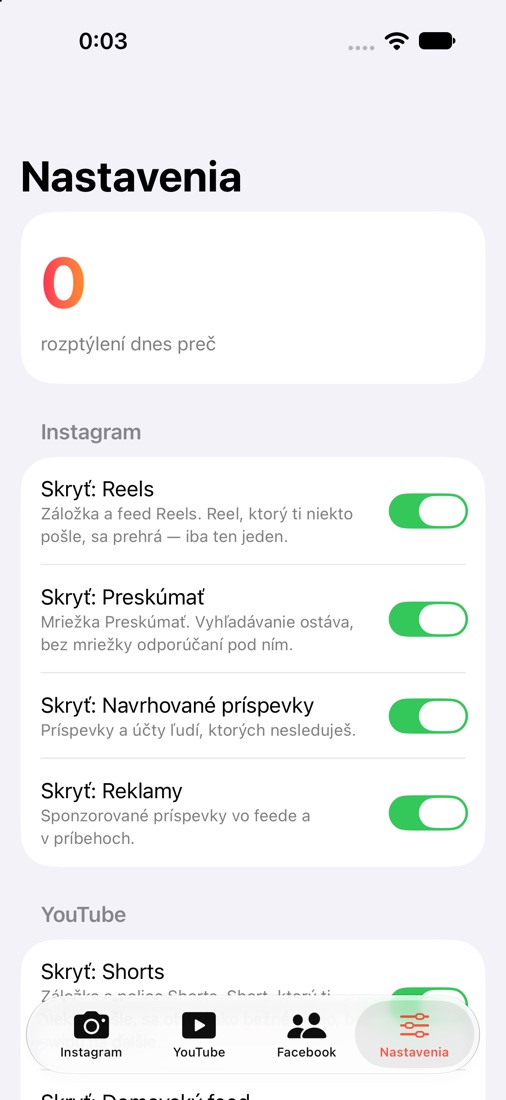
Nescroll settings with switches for Reels, Explore, suggested posts and ads
Real screen from the development build

One short video takes a few seconds. The trouble is the next one, and the one after it. Nescroll keeps the one somebody sent you and stops offering the next.

If you scroll minutes a day, that is 15.2 days a year.

7 hours a week. Your own number is in iPhone Settings → Screen Time. This is arithmetic, not a promise of savings.

Where the limits are.

Nescroll can

Change the web versions of Instagram, YouTube and Facebook that you open inside it, and lock the native apps with Screen Time.

Nescroll can't

Change the native Instagram or YouTube app from the inside. iOS doesn't allow that for any app.

Needs Apple's approval

The Screen Time lock uses Apple's Family Controls entitlement, which Apple grants per app before it can ship on the App Store.

Not promised

TikTok, Snapchat, Android, notifications or a parental mode.

For developers: the full source.

What you get

The complete SwiftUI project (XcodeGen), the Screen Time monitor and shield extensions, the filter engine with per-site rules, remote rule updates over HTTPS, onboarding, a 7-day stats chart, English and Slovak, unit tests and step-by-step documentation.

Rebrand in minutes

One AppConfig file for the name, links, sites and rule server, one project file for bundle IDs and the App Group, and your own icon. No server to run.

Where to get it

Coming to CodeCanyon. See the MIKODES portfolio.

What you need

A Mac with Xcode, an Apple Developer account, and your own Family Controls approval from Apple for the Screen Time part.

Questions.

When does it ship?

It is in development and being tested on real iPhones. There is no date yet. Write to us and we will let you know.

Does Reels disappear from the Instagram app too?

No. iOS doesn't let any app change another app. Instagram without Reels lives in Nescroll, and the Lock tab can keep the native app shut.

Where does my password go?

Straight to Instagram, YouTube or Facebook, on their own sign-in page. Nescroll has no server.

Notifications?

Not in the first version. Keep them on in the native app.

Price?

Not set yet for the app. It will be published before release.

Are you part of Instagram, YouTube or Facebook?

No. Nescroll is independent. The site names are here only to say what it works with.

Close the app.

Your friend will reply anyway.

Talk to the people who built it.

Want to hear about the release, test it, or need installation and customization of the source? Write to us.

Also by MIKODES.